Case Study
Add Devices to Networking Platform
Add Devices to Networking Platform
Case Study
Add Devices to Networking Platform
Project Overview
Project Overview
Project Overview
In a unified enterprise network platform, security and AI capabilities are integrated into a single platform. Network operators need to add and configure a wide range of devices to this platform. Because several products were quickly integrated into the platform, the backend APIs remained essentially unchanged, leading to complexity.
In a unified enterprise network platform, security and AI capabilities are integrated into a single platform. Network operators need to add and configure a wide range of devices to this platform. Because several products were quickly integrated into the platform, the backend APIs remained essentially unchanged, leading to complexity.
In a unified enterprise network platform, security and AI capabilities are integrated into a single platform. Network operators need to add and configure a wide range of devices to this platform. Because several products were quickly integrated into the platform, the backend APIs remained essentially unchanged, leading to complexity.
In a unified enterprise network platform, security and AI capabilities are integrated into a single platform. Network operators need to add and configure a wide range of devices to this platform. Because several products were quickly integrated into the platform, the backend APIs remained essentially unchanged, leading to complexity.
Problem Statement
Problem Statement
Problem Statement
Redesign the legacy device onboarding flow to fix usability gaps and align it with the design system. Extend the experience to support multiple device types, enabling flexible configuration across them within a single, consistent interface.
Redesign the legacy device onboarding flow to fix usability gaps and align it with the design system. Extend the experience to support multiple device types, enabling flexible configuration across them within a single, consistent interface.
Redesign the legacy device onboarding flow to fix usability gaps and align it with the design system. Extend the experience to support multiple device types, enabling flexible configuration across them within a single, consistent interface.
Timeline
Nov 2024 -Present
Team
Senior UX Designer (lead)
2 UX Designers (temporary support)
Principal UX Designer (advisor)
My Role
Led UX for the device onboarding experience across requirements, flows, interactions, and error scenarios.
Defined scalable end-to-end workflows within strict API and system constraints.
Partnered closely with three product managers and engineering to align UX with platform realities.
Guided supporting designers through requirement changes and ensured design continuity through implementation.
Timeline
Timeline
Nov 2024 -Present
Nov 2024 -Present
Nov 2024 -Present
Team
Team
Senior UX Designer (lead)
2 UX Designers (temporary support)
Principal UX Designer (advisor)
Senior UX Designer (lead)
2 UX Designers (temporary support)
Principal UX Designer (advisor)
Senior UX Designer (lead)
2 UX Designers (temporary support)
Principal UX Designer (advisor)
My Role
My Role
Led UX for the device onboarding experience across requirements, flows, interactions, and error scenarios.
Defined scalable end-to-end workflows within strict API and system constraints.
Partnered closely with three product managers and engineering to align UX with platform realities.
Guided supporting designers through requirement changes and ensured design continuity through implementation.
Led UX for the device onboarding experience across requirements, flows, interactions, and error scenarios.
Defined scalable end-to-end workflows within strict API and system constraints.
Partnered closely with three product managers and engineering to align UX with platform realities.
Guided supporting designers through requirement changes and ensured design continuity through implementation.
Led UX for the device onboarding experience across requirements, flows, interactions, and error scenarios.
Defined scalable end-to-end workflows within strict API and system constraints.
Partnered closely with three product managers and engineering to align UX with platform realities.
Guided supporting designers through requirement changes and ensured design continuity through implementation.
Outcomes
Outcomes
Network admins can instantly identify failed serial numbers and edit or remove them without restarting the flow.
Multiple supported device types can now be added in a single action through import device flow, eliminating repeated add-device attempts that were happening earlier.
Clear failure reasons help users correct their inputs and successfully add devices on retry.
API could not reliably detect device type for all serial numbers
Adding different types of device serial numbers together led to an error, and there was no scope to understand which serial number to remove.
Not much can be changed in the backend validation logic due to time constraints.
Network admins can instantly identify failed serial numbers and edit or remove them without restarting the flow.
Multiple supported device types can now be added in a single action through import device flow, eliminating repeated add-device attempts that were happening earlier.
Clear failure reasons help users correct their inputs and successfully add devices on retry.
Network admins can instantly identify failed serial numbers and edit or remove them without restarting the flow.
Multiple supported device types can now be added in a single action through import device flow, eliminating repeated add-device attempts that were happening earlier.
Clear failure reasons help users correct their inputs and successfully add devices on retry.

Process
Process
Process
Exploration & Discovery
Exploration & Discovery
What I Did
What I Did
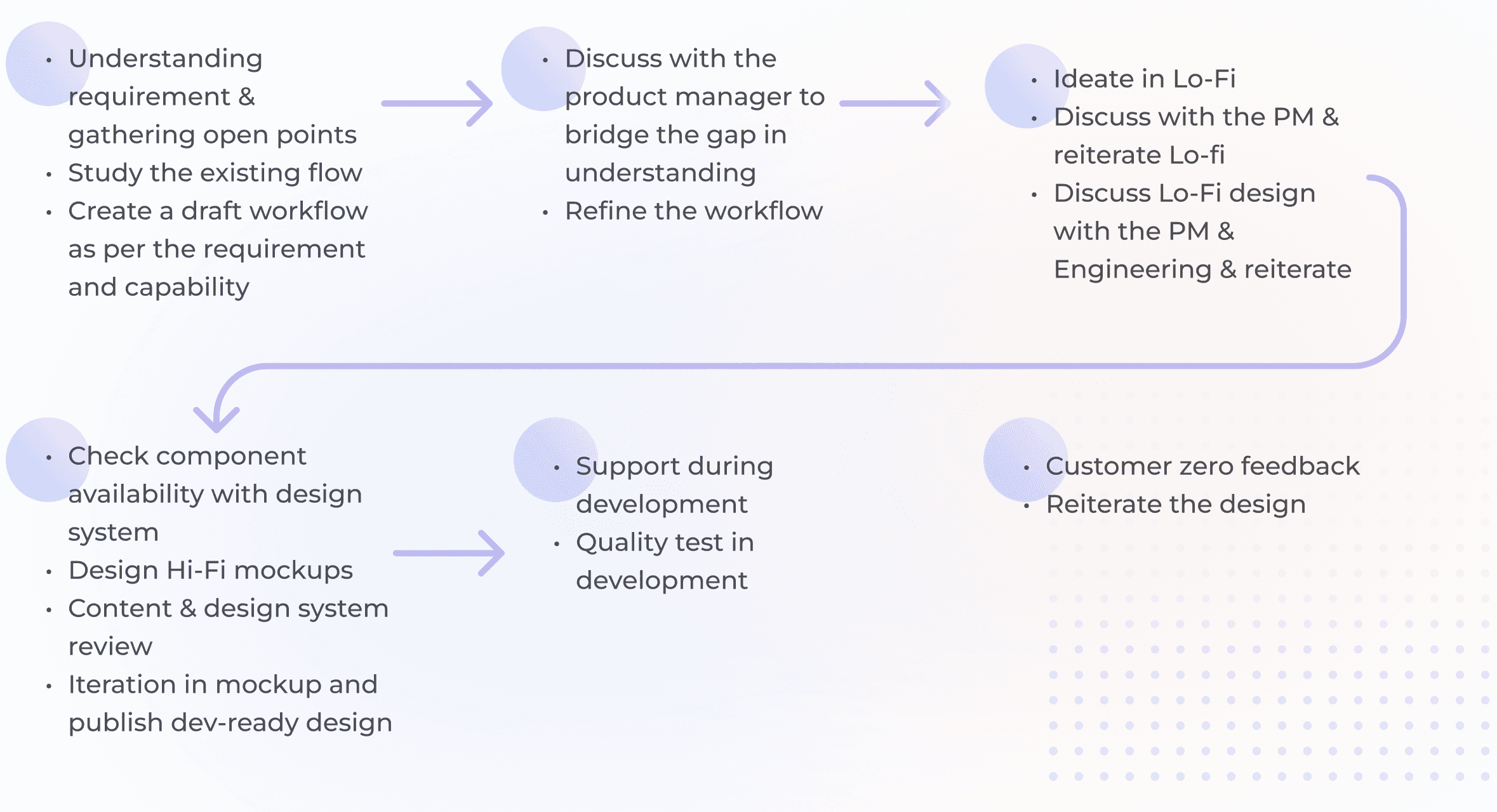
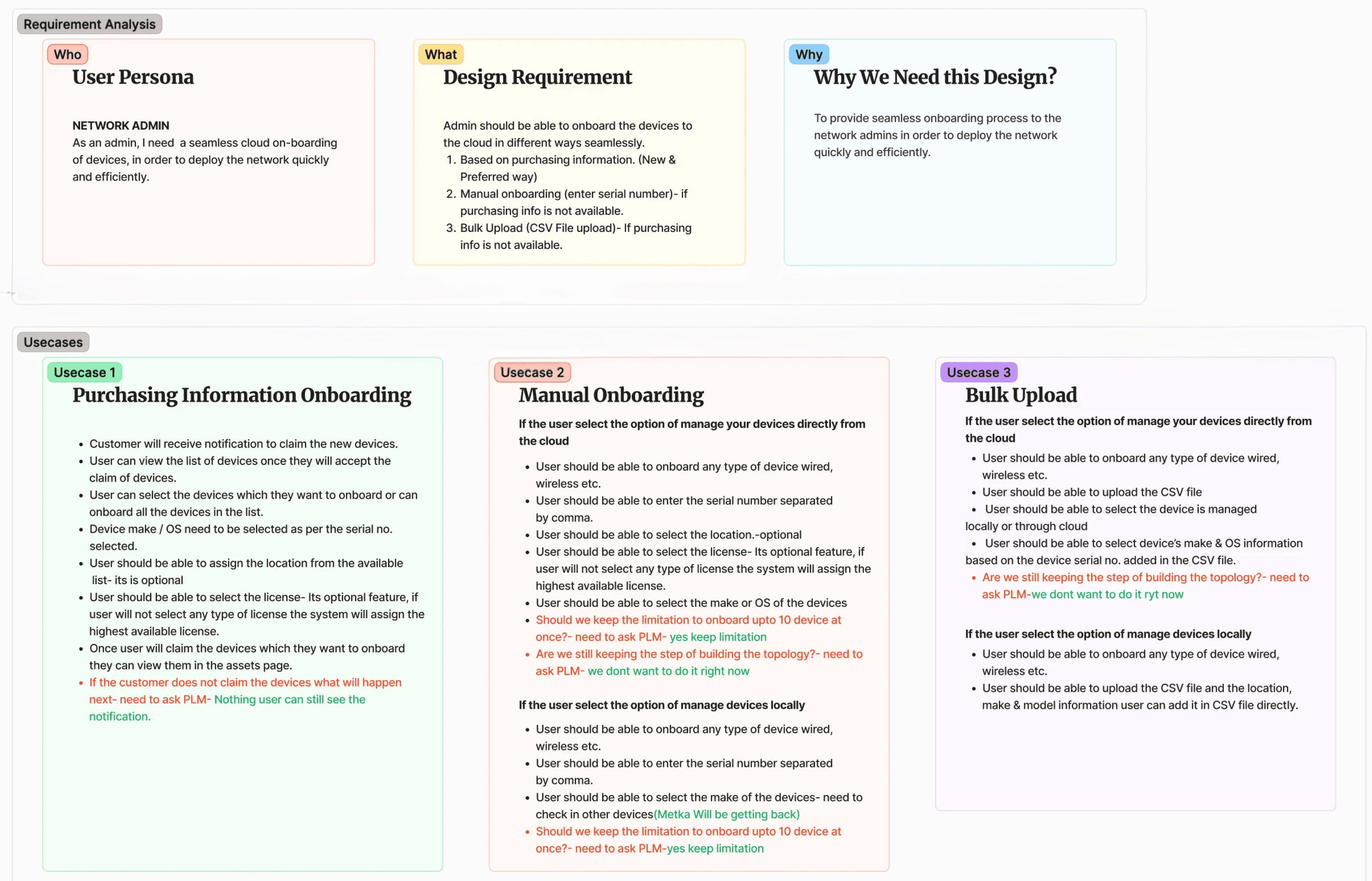
Reviewed existing onboarding flows and did requirement analysis
Facilitated alignment sessions with PMs and engineering.
Created user flow from the understanding.
Reviewed existing onboarding flows and did requirement analysis
Facilitated alignment sessions with PMs and engineering.
Created user flow from the understanding.
Reviewed existing onboarding flows and did requirement analysis
Facilitated alignment sessions with PMs and engineering.
Created user flow from the understanding.
Requirement Analysis and Usecase Mapping
Requirement Analysis and Usecase Mapping
Requirement Analysis and Usecase Mapping
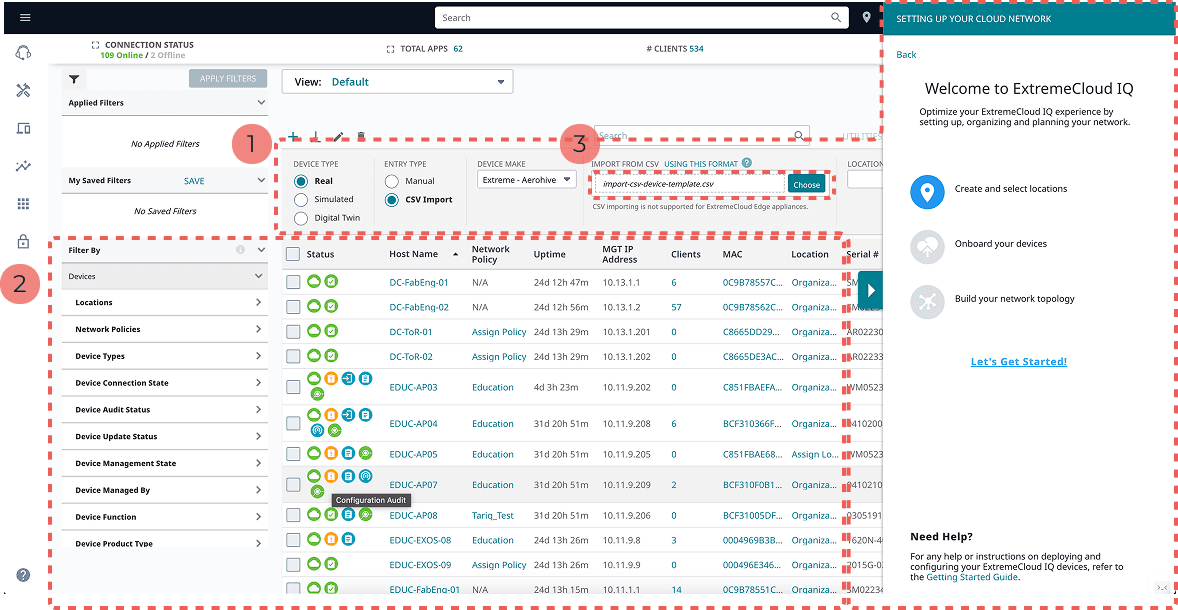
Inconsistency in design with two entry points to onboard devices that open together and one without a clear sign of exit.
More cognitive load for the user as everything is accessible to the user in the background.
The file has been uploaded successfully, but it is not clear how to clear out the current file.
Inconsistency in design with two entry points to onboard devices that open together and one without a clear sign of exit.
More cognitive load for the user as everything is accessible to the user in the background.
The file has been uploaded successfully, but it is not clear how to clear out the current file.
Inconsistency in design with two entry points to onboard devices that open together and one without a clear sign of exit.
More cognitive load for the user as everything is accessible to the user in the background.
The file has been uploaded successfully, but it is not clear how to clear out the current file.
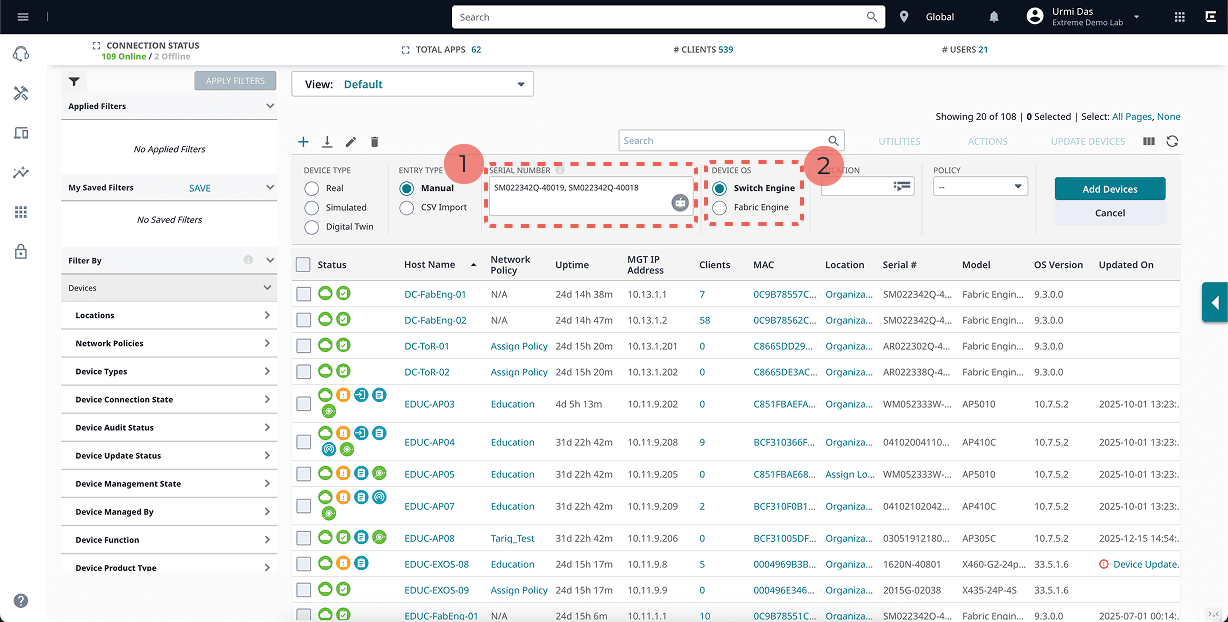
Difficult to read comma-separated serial numbers.
Inconsistency in design for the ‘Device OS’ selection and the ‘Device Make’ selection as per different serial numbers, and sometimes the background API cannot recognize the serial number as well.
Difficult to read comma-separated serial numbers.
Inconsistency in design for the ‘Device OS’ selection and the ‘Device Make’ selection as per different serial numbers, and sometimes the background API cannot recognize the serial number as well.
Difficult to read comma-separated serial numbers.
Inconsistency in design for the ‘Device OS’ selection and the ‘Device Make’ selection as per different serial numbers, and sometimes the background API cannot recognize the serial number as well.
Constraints
Constraints
API could not reliably detect device type for all serial numbers
Adding different types of device serial numbers together led to an error, and there was no scope to understand which serial number to remove.
Not much can be changed in the backend validation logic due to time constraints.
API could not reliably detect device type for all serial numbers
Adding different types of device serial numbers together led to an error, and there was no scope to understand which serial number to remove.
Not much can be changed in the backend validation logic due to time constraints.
API could not reliably detect device type for all serial numbers
Adding different types of device serial numbers together led to an error, and there was no scope to understand which serial number to remove.
Not much can be changed in the backend validation logic due to time constraints.
API could not reliably detect device type for all serial numbers
Adding different types of device serial numbers together led to an error, and there was no scope to understand which serial number to remove.
Not much can be changed in the backend validation logic due to time constraints.
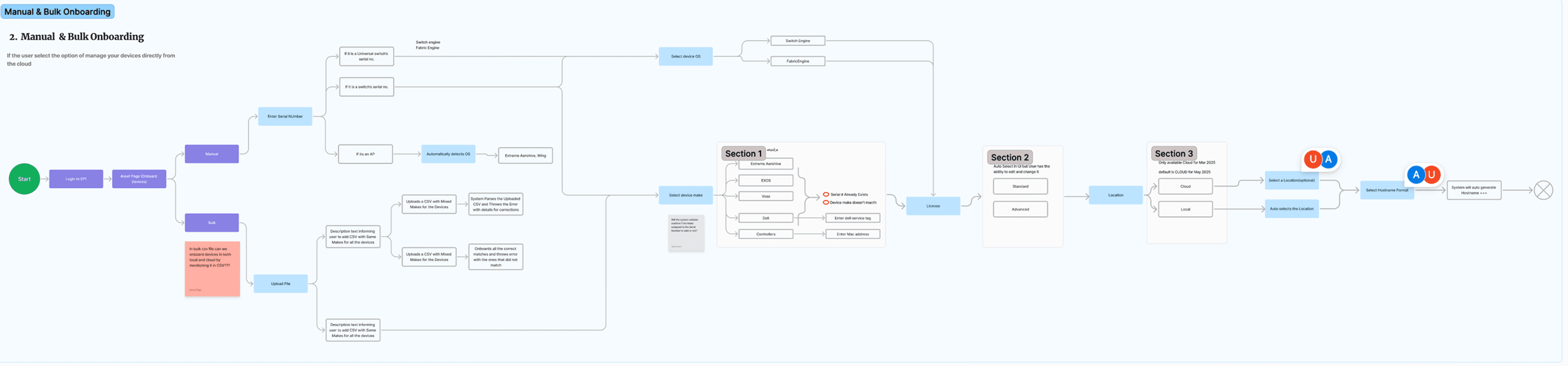
The requirement changed and matured as we gained an understanding of the technological capabilities from QA and the Architect. So, I changed the workflow based on feasibility and the product manager’s requirements.
API could not reliably detect device type for all serial numbers
Adding different types of device serial numbers together led to an error, and there was no scope to understand which serial number to remove.
Not much can be changed in the backend validation logic due to time constraints.
The requirement changed and matured as we gained an understanding of the technological capabilities from QA and the Architect. So, I changed the workflow based on feasibility and the product manager’s requirements.
The requirement changed and matured as we gained an understanding of the technological capabilities from QA and the Architect. So, I changed the workflow based on feasibility and the product manager’s requirements.
Ideation
Ideation
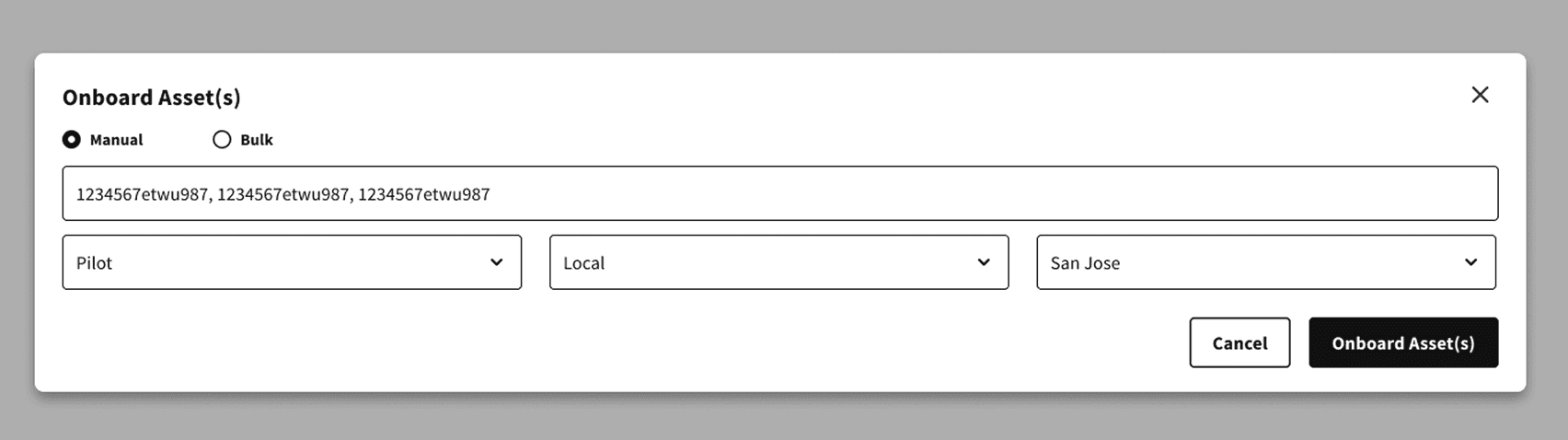
Comma seperated serial numbers were not very easy to read for the user
Comma seperated serial numbers were not very easy to read for the user
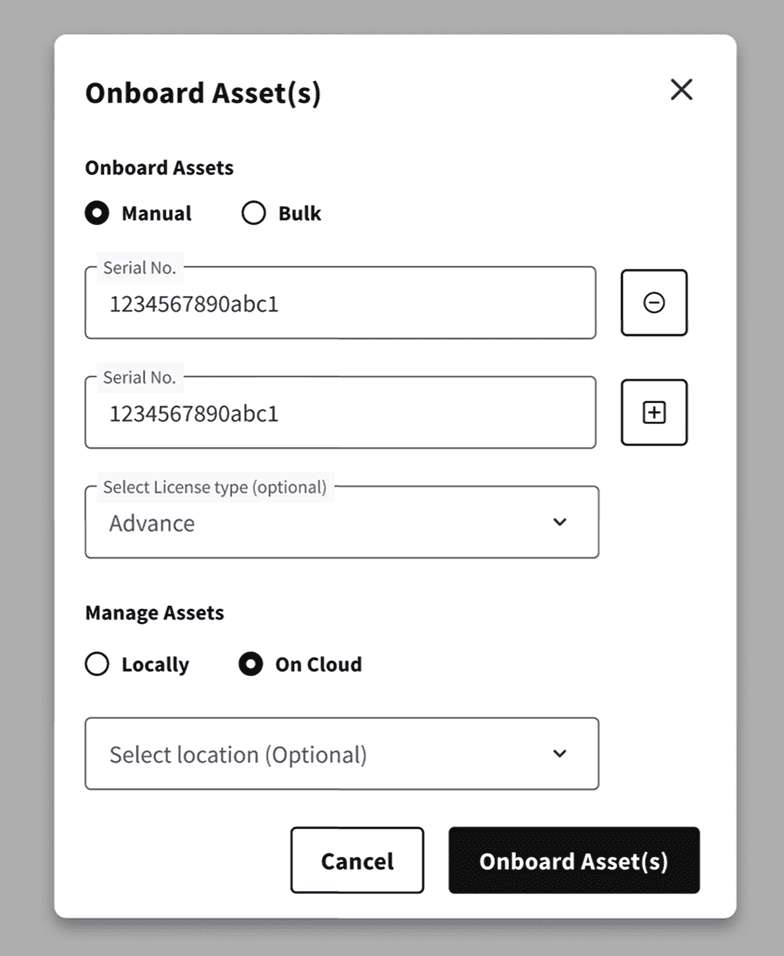
Added separate input box for serial number for better readability along with options to add or delete action.
Added separate input box for serial number for better readability along with options to add or delete action.
Added separate input box for serial number for better readability along with options to add or delete action.
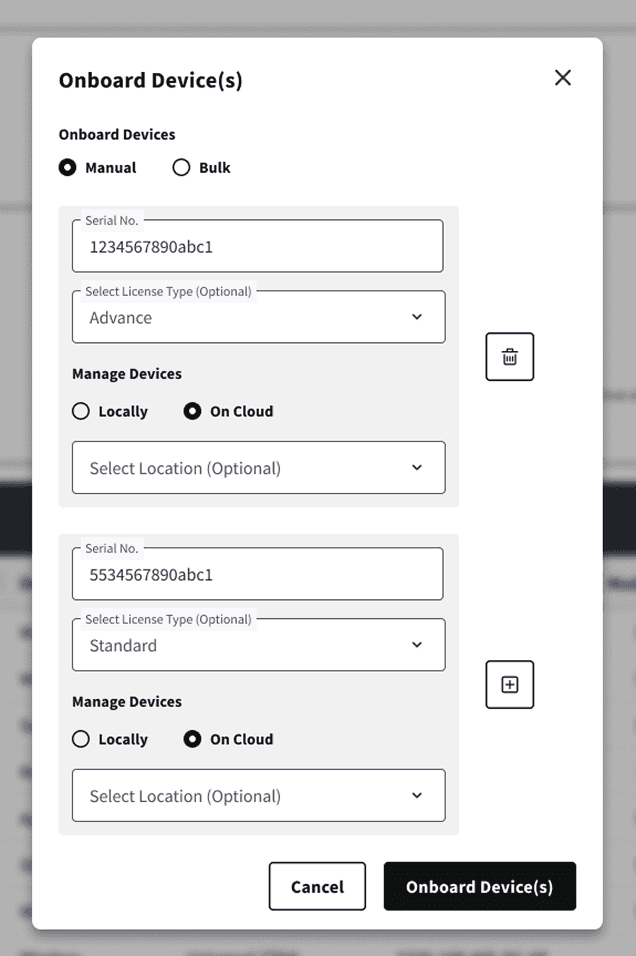
Worked on an option where different devices can be onboarded to different locations and can be managed by the cloud or locally. But this was not technically feasible.
Worked on an option where different devices can be onboarded to different locations and can be managed by the cloud or locally. But this was not technically feasible.
Difficult to read comma-separated serial numbers.
Inconsistency in design for the ‘Device OS’ selection and the ‘Device Make’ selection as per different serial numbers, and sometimes the background API cannot recognize the serial number as well.
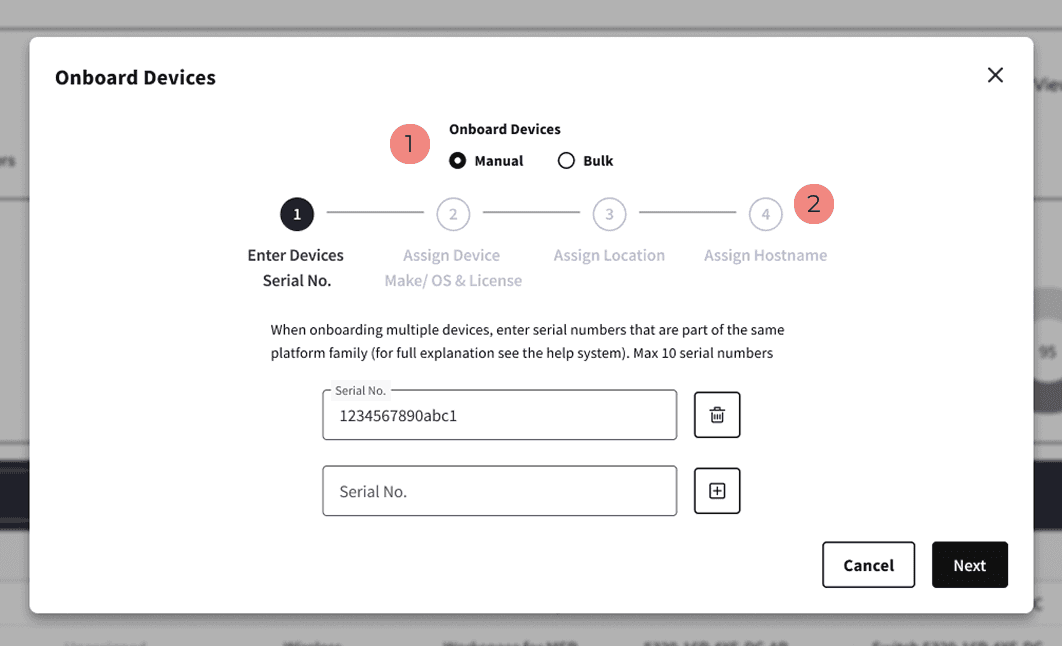
Placing Manual and Bulk as top-level options increased the risk of accidental context switching. If a user changed the mode mid-flow, all entered data was lost. To prevent data loss and reduce error risk during device onboarding, I removed this later.
As the 10 serial nos. were taking up a lot of space in the dialogue, and with the addition of ‘Assign Hostname’ later in the requirement, it was logical to categorise the process into different steps.
Placing Manual and Bulk as top-level options increased the risk of accidental context switching. If a user changed the mode mid-flow, all entered data was lost. To prevent data loss and reduce error risk during device onboarding, I removed this later.
As the 10 serial nos. were taking up a lot of space in the dialogue, and with the addition of ‘Assign Hostname’ later in the requirement, it was logical to categorise the process into different steps.
Hi-Fidelity Design
Hi-Fidelity Design
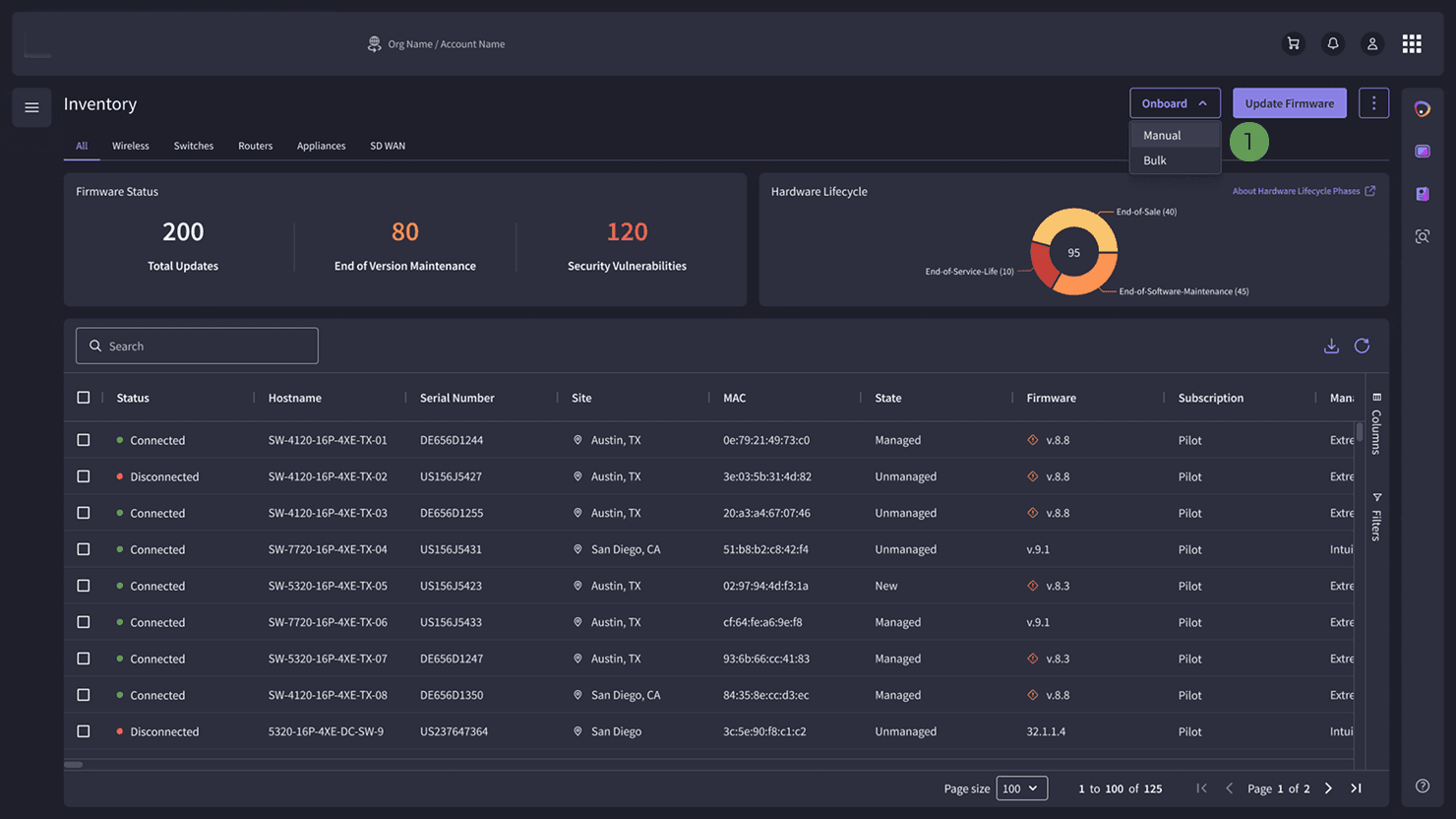
Placed different onboarding mode outside the dialogue to prevent error during onboarding
Placed different onboarding mode outside the dialogue to prevent error during onboarding
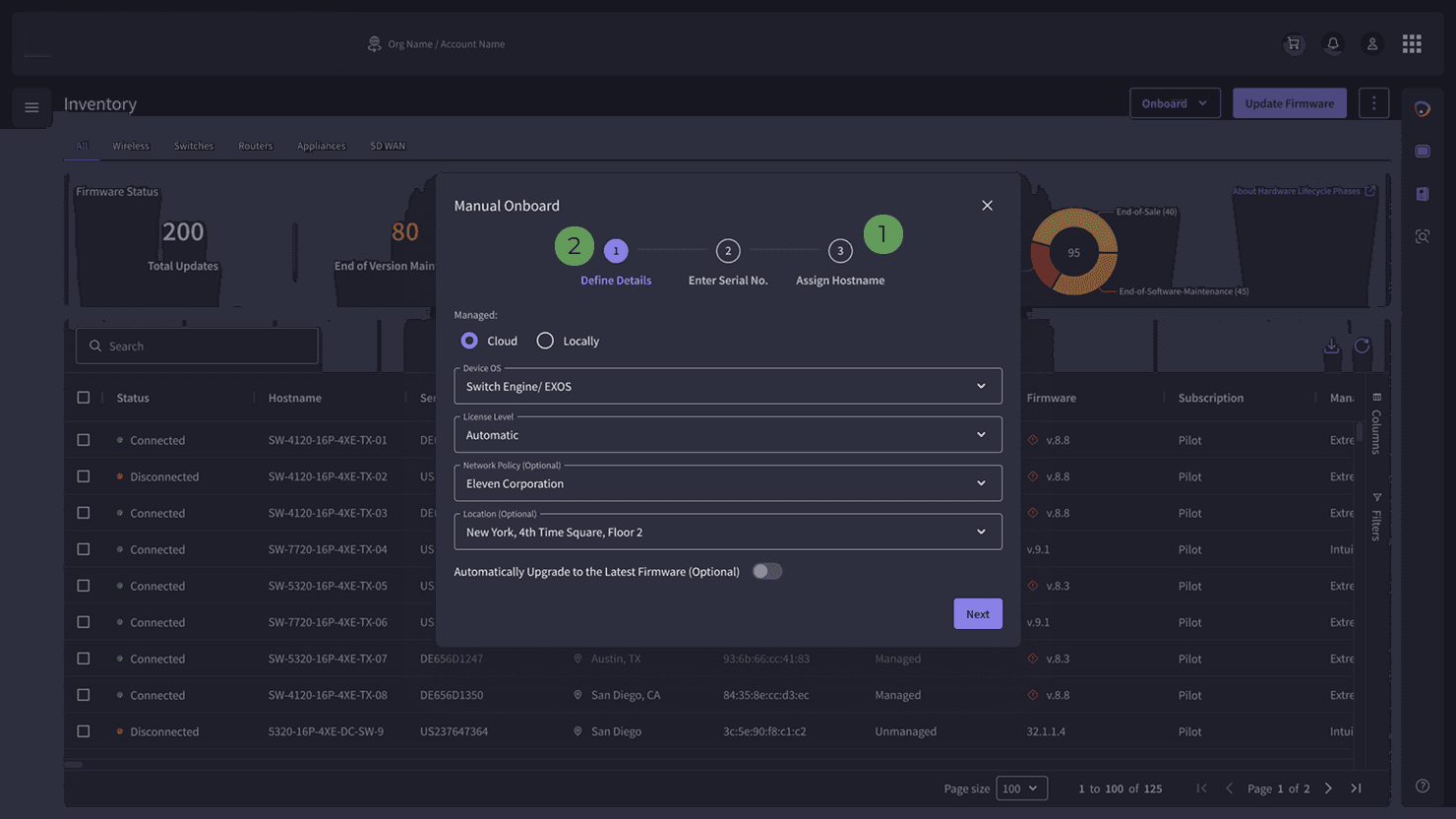
Due to API limitations, device type and OS could not be identified for some serial numbers. To prevent onboarding failures, device type selection was moved earlier in the flow, restricting mixed device types in a single onboarding action.
The steps were condensed from four to three, keeping all the details in a single step
Due to API limitations, device type and OS could not be identified for some serial numbers. To prevent onboarding failures, device type selection was moved earlier in the flow, restricting mixed device types in a single onboarding action.
The steps were condensed from four to three, keeping all the details in a single step
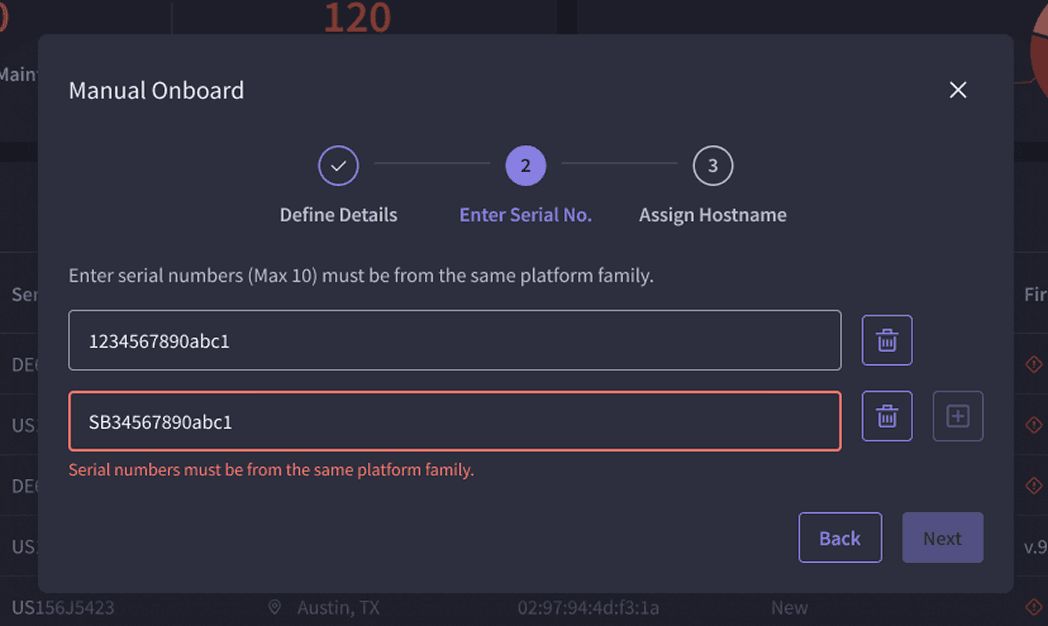
A new field to add a serial number was enabled on the click of Enter, Space, or Comma, which matches real-world interaction.
A new field to add a serial number was enabled on the click of Enter, Space, or Comma, which matches real-world interaction.
A new field to add a serial number was enabled on the click of Enter, Space, or Comma, which matches real-world interaction.
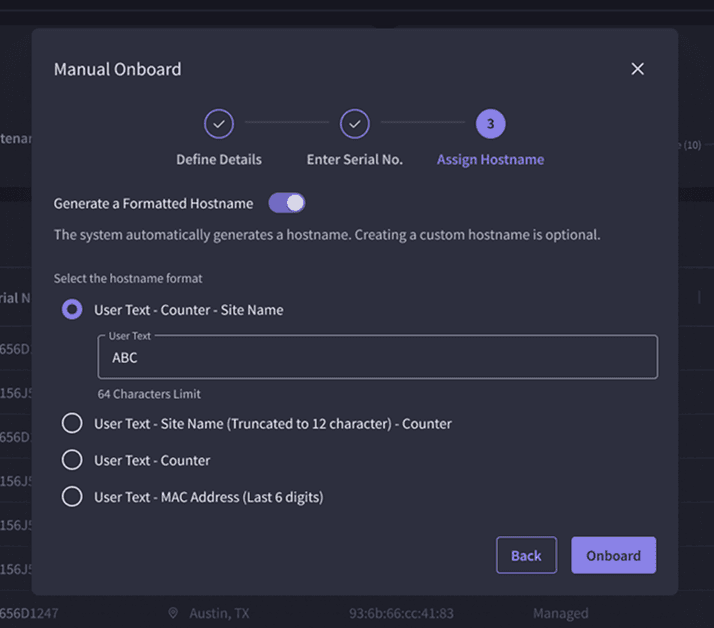
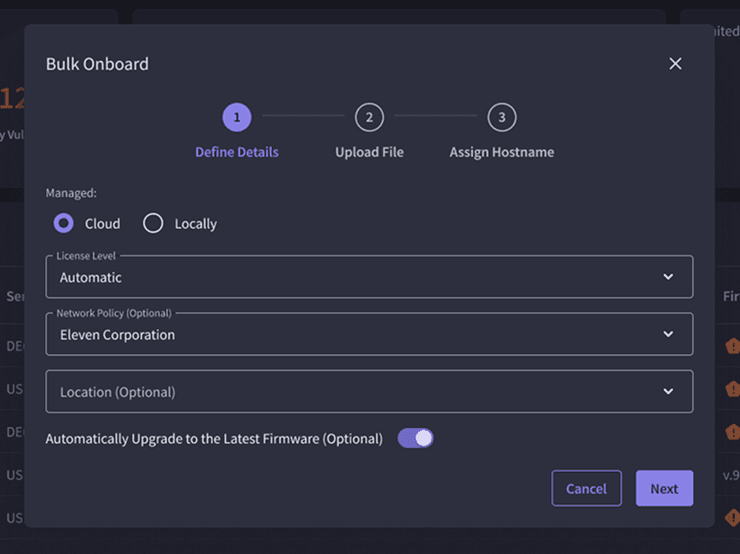
Bulk onboarding now supports mixed device types via .xlsx upload, removing previous file format(csv) constraints.
Bulk onboarding now supports mixed device types via .xlsx upload, removing previous file format(csv) constraints.
Bulk onboarding now supports mixed device types via .xlsx upload, removing previous file format(csv) constraints.
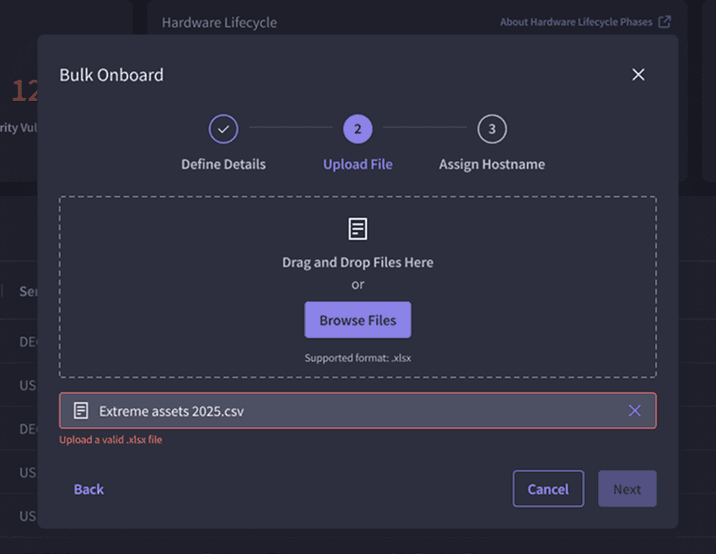
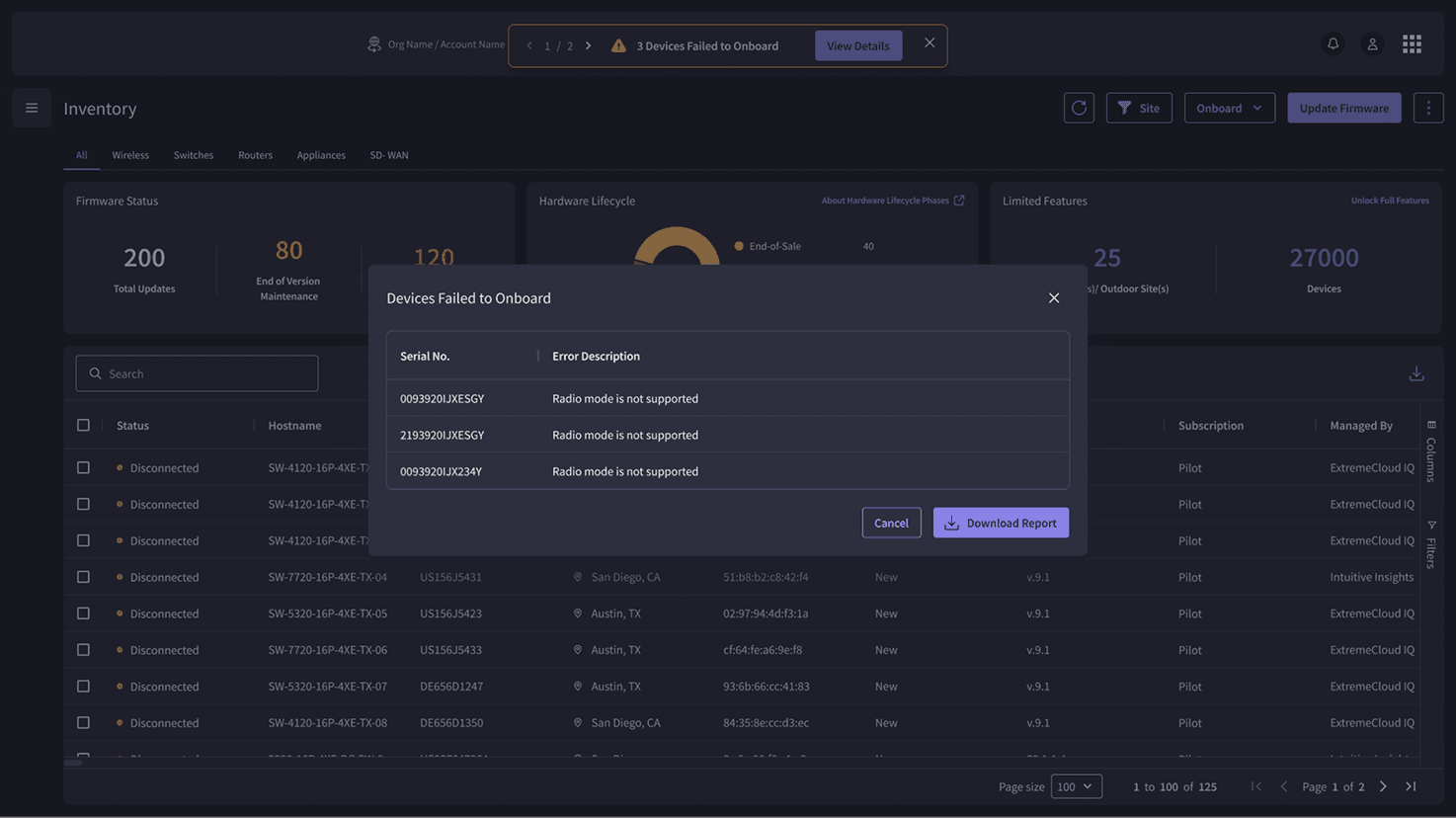
Introduced option to show failed serial numbers with error reasons in a dedicated dialog. Recovery actions are limited to error identification due to backend constraints.
Introduced option to show failed serial numbers with error reasons in a dedicated dialog. Recovery actions are limited to error identification due to backend constraints.
Updated Design
Updated Design
We received some feedback from users on the four months of design being in production. Based on this feedback, I revised the design and content with the content team to improve the experience. Also, as different devices, such as universal compute platforms and third-party management engine onboarding, were introduced, we needed a flexible design to accommodate different onboarding types for technical feasibility.
We received some feedback from users on the four months of design being in production. Based on this feedback, I revised the design and content with the content team to improve the experience. Also, as different devices, such as universal compute platforms and third-party management engine onboarding, were introduced, we needed a flexible design to accommodate different onboarding types for technical feasibility.
We received some feedback from users on the four months of design being in production. Based on this feedback, I revised the design and content with the content team to improve the experience. Also, as different devices, such as universal compute platforms and third-party management engine onboarding, were introduced, we needed a flexible design to accommodate different onboarding types for technical feasibility.
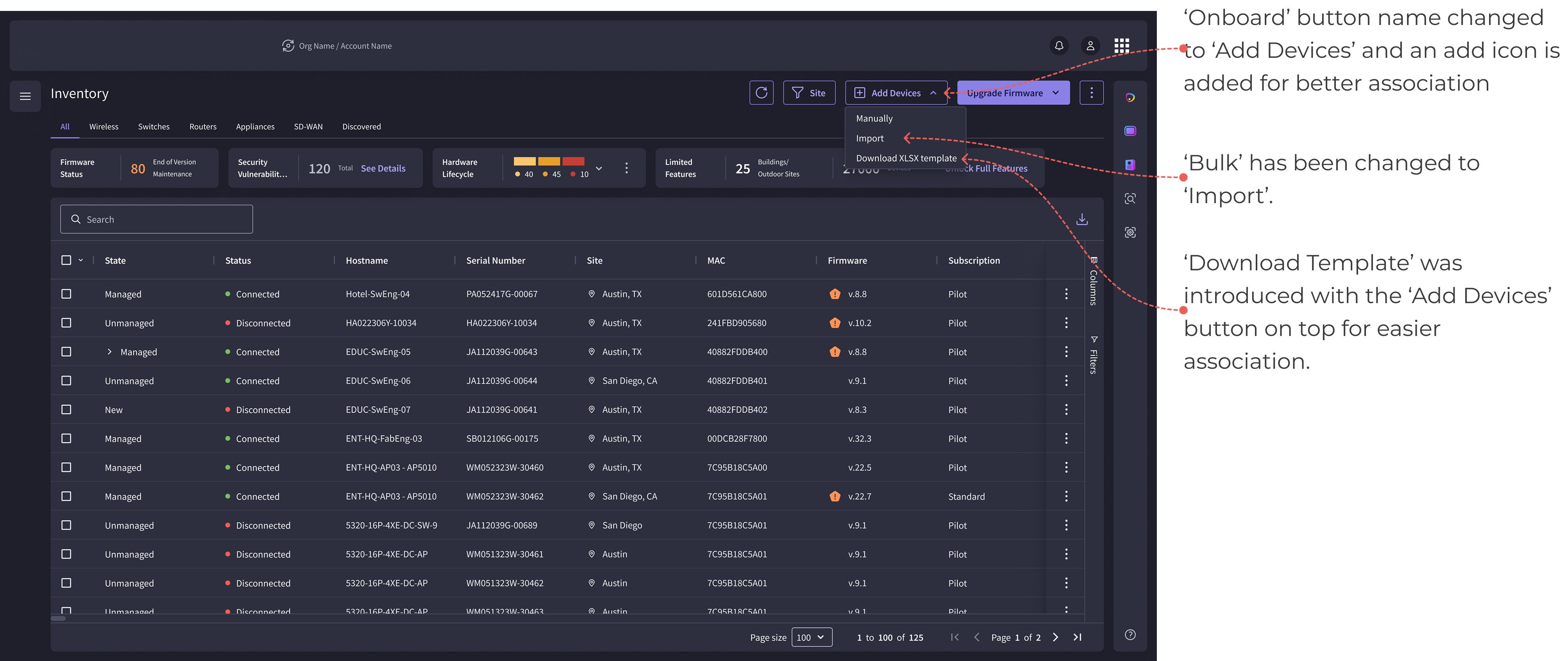
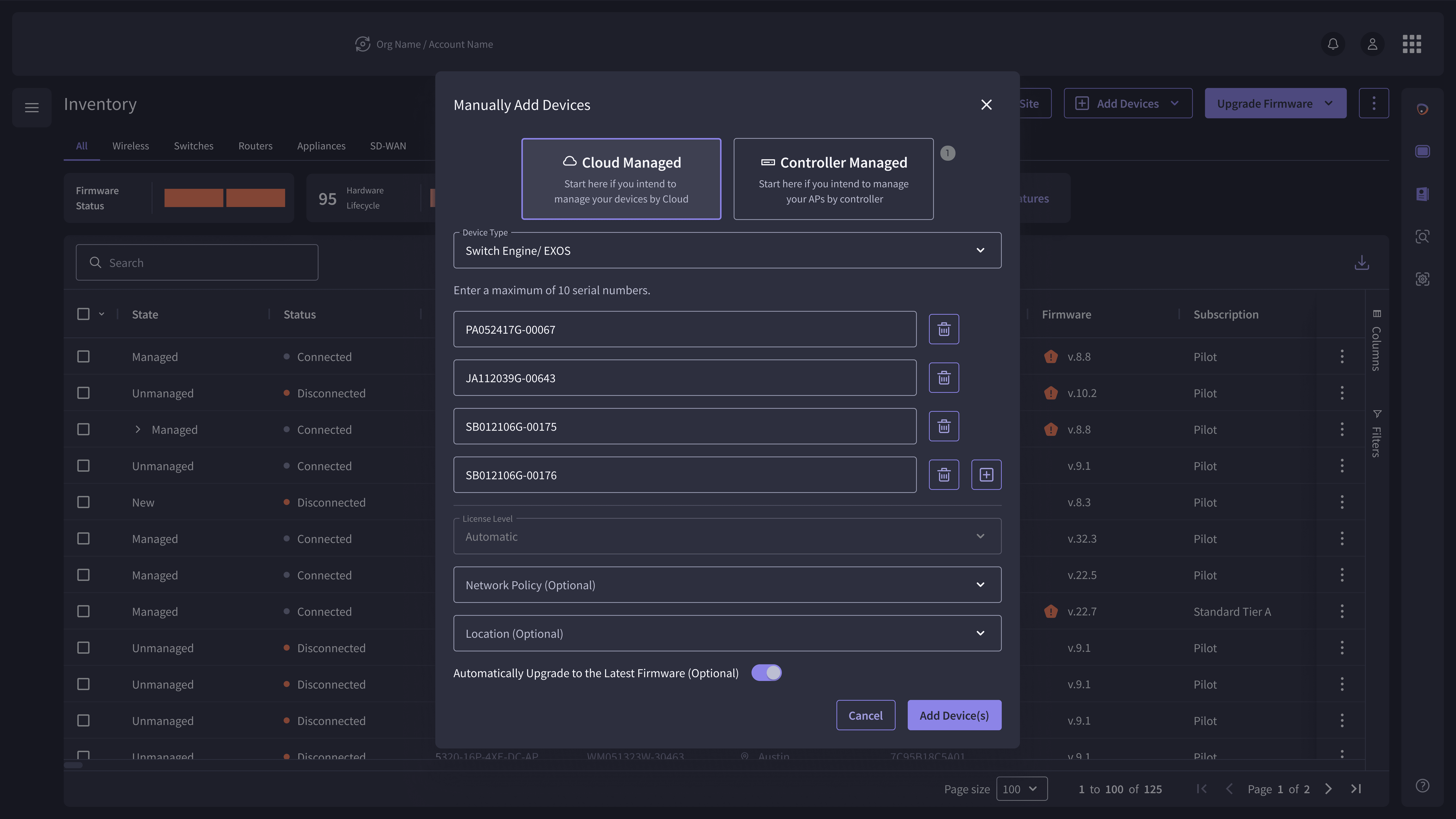
User faced legibility issues with the radio button component in device management section. A different selection component was used along with icons and helper text to better inform the user.
‘Assign Hostname’ module moved under a different module, and the stepper did not make sense for only two fields. Also, it hindered the user experience with an increased no of clicks.
So removed the stepper here and combined the mandatory steps at the top with the optional steps into separate sections.
User faced legibility issues with the radio button component in device management section. A different selection component was used along with icons and helper text to better inform the user.
‘Assign Hostname’ module moved under a different module, and the stepper did not make sense for only two fields. Also, it hindered the user experience with an increased no of clicks.
So removed the stepper here and combined the mandatory steps at the top with the optional steps into separate sections.
Learnings
Learnings
Designing around technical constraints without degrading User Experience.
Using user mental models over internal terminology.
Facilitating alignment across Product Managers and engineering under ambiguity.
API could not reliably detect device type for all serial numbers
Adding different types of device serial numbers together led to an error, and there was no scope to understand which serial number to remove.
Not much can be changed in the backend validation logic due to time constraints.
Designing around technical constraints without degrading User Experience.
Using user mental models over internal terminology.
Facilitating alignment across Product Managers and engineering under ambiguity.
Designing around technical constraints without degrading User Experience.
Using user mental models over internal terminology.
Facilitating alignment across Product Managers and engineering under ambiguity.
Success Metrics
Success Metrics
Goals
Goals
Measures
Scalability
Scalability
Scalability
Improved scalability by 40%
Improved scalability by 40%
Improved scalability by 40%
Progressive disclosure of fields as per different device type.
Progressive disclosure of fields as per different device type.
Error Prevention
Error Prevention
Error Prevention
Error prevention increased by 76%
Error prevention increased by 76%
Error prevention increased by 76%
Chances to select the wrong option after filling out the whole form.
Finding errors in the serial no. fields.
Chances to select the wrong option after filling out the whole form.
Finding errors in the serial no. fields.
Efficiency of System
Increased by 66%
Increased by 66%
Increased by 66%
Marking of the optional field.
Restriction of dual onboarding entry points.
Simplifying the flow.
Marking of the optional field.
Restriction of dual onboarding entry points.
Simplifying the flow.
Import Device Efficiency
Import Device Efficiency
Import Device Efficiency
Increased by 66%
Increased by 66%
Increased by 66%
Adds all the different device types together
Adds all the different device types together
Error Identification
Error Identification
Error Identification
Increased by 100%
Increased by 100%
Increased by 100%
Showcases devices failed to add with reasons for failure against their serial no.
Showcases devices failed to add with reasons for failure against their serial no.